|
WMA stands for Windows Media Audio. The WMA file format is proprietary to Microsoft, and is used mostly for music files. WMA files are compressed, similar to MP3 files. With PowerISO, you can rip Audio CDs to wma files.
-
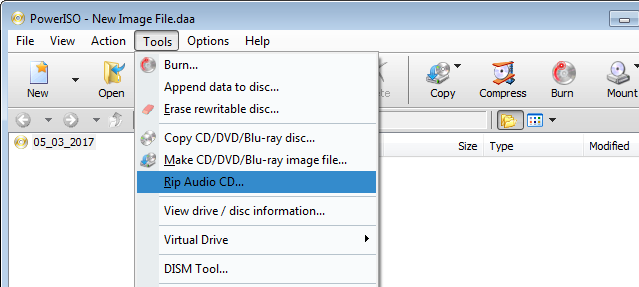
Insert the Audio CD into the drive, Run PowerISO, and select
"Tools > Rip Audio CD" Menu.
-
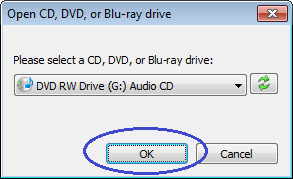
The "Open drive" dialog shows. Select the drive which holds the disc you want to rip,
and click "OK".
-
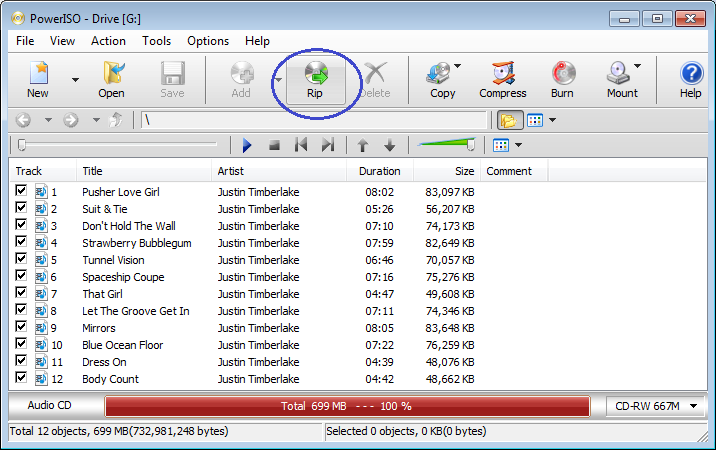
PowerISO shows Audio CD Ripper window, and list all
tracks in the disc.
Select the audio tracks which you want to rip wma files, and
click "Rip" button on toolbar.
-
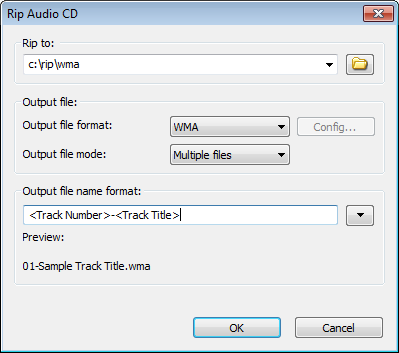
PowerISO shows WMA Ripper dialog.
Choose the output folder, and set the output format to WMA.
The default output file name format is "<Track Number>-<Track
Title>.wma", you can change it by clicking with down arrow button.
-
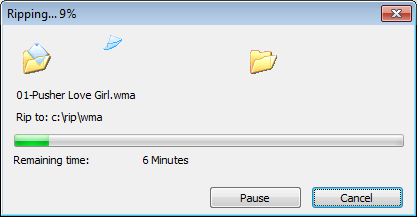
Click "OK" to start ripping wma files. PowerISO
will show the progress information during ripping.
|
