|
|||||||||
|
How to Make ISO File from CD, DVD, or Blu-ray Disc? |
|||||||||
|
You are here: Tutorials > How to Make ISO File from CD, DVD, or Blu-ray Disc? |
|||||||||
|
|
|||||||||
|
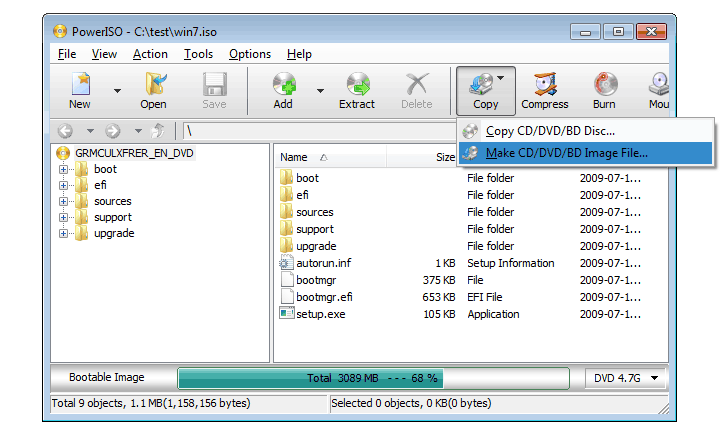
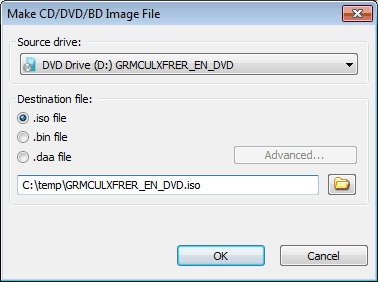
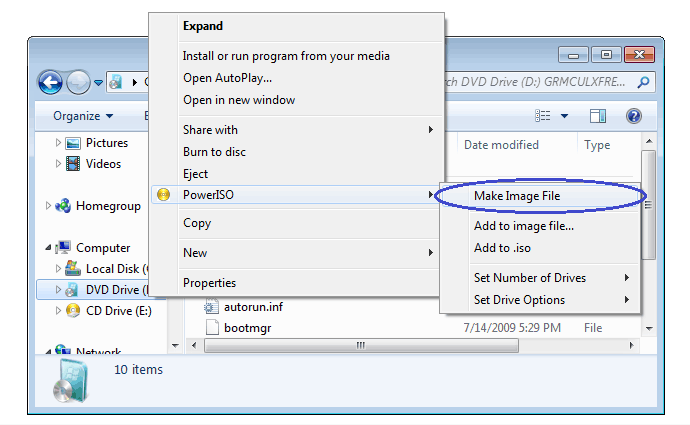
PowerISO can make an ISO file from a CD, DVD, or Blu-ray disc. PowerISO do a sector-by-sector copying. All information in the disc, including the boot information, will be copied. You can launch the iso maker using the main program or the shell context menu. Usage1: Make ISO file using the main program:
Usage2: Make ISO file using the shell context menu:
|
|||||||||
|
Copyright 2004-2024 Power Software Ltd. All rights reserved. |
|||||||||